Hardware Description
This article describes the hardware configuration of the EMBER Hotspot.
EMBER Hotspot Overview
The EMBER Hotspot is based on the RBM33G platform from MikroTik.
It is equipped with a LoRaWAN card and can optionally include an LTE modem.
The enclosure and connectors are water-proof and dust-proof, providing IP67 protection.
Connector Layout
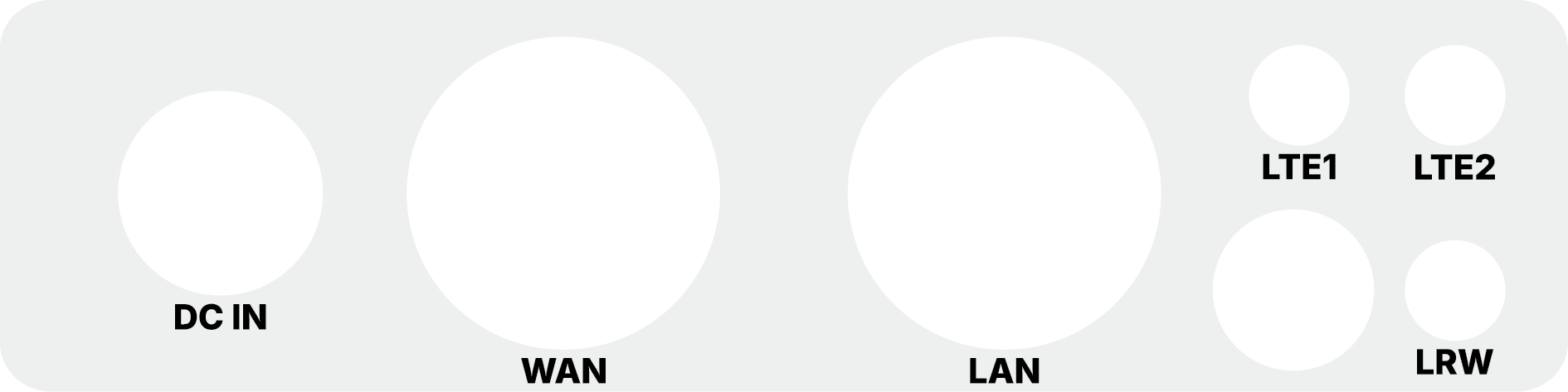
External Connectors & Antennas
The device is equipped with high-quality connectors for power, networking, and wireless communication.
Antennas
- LRW (LoRaWAN): One N-type connector for the LoRa antenna. Required for gateway operation.
- LTE1 & LTE2: Two connectors for LTE antennas (Main and Diversity). Used if the LTE modem is installed to provide cellular backhaul (supports 2G / 3G / 4G).
Power and Data
- DC IN: Circular industrial connector for external 24 V DC power supply.
- LAN (Ethernet): Used for local configuration, device management, and troubleshooting.
- WAN (Ethernet + PoE): Primary interface for internet connectivity. This port also supports Passive PoE IN for powering the device.
Network Interfaces
The EMBER Hotspot provides two metallic RJ45 Ethernet ports (10/100/1000 Mbit/s) hidden behind waterproof cable glands:
-
LAN (Located on the right side of the device)
- Local configuration
- Device management
- Troubleshooting
-
WAN (Located on the left side of the device)
- Internet connectivity to the cloud
- Used for PoE power input
Power Supply Options
The device can be powered by:
- 24 V DC power adapter (via DC IN)
- 24 V DC power supply (via DC IN)
- 24 V DC passive PoE (Power over Ethernet) via the WAN port
For outdoor installations, the EMBER Hotspot must be mounted with connectors facing down to maintain its IP67 rating and prevent water accumulation.